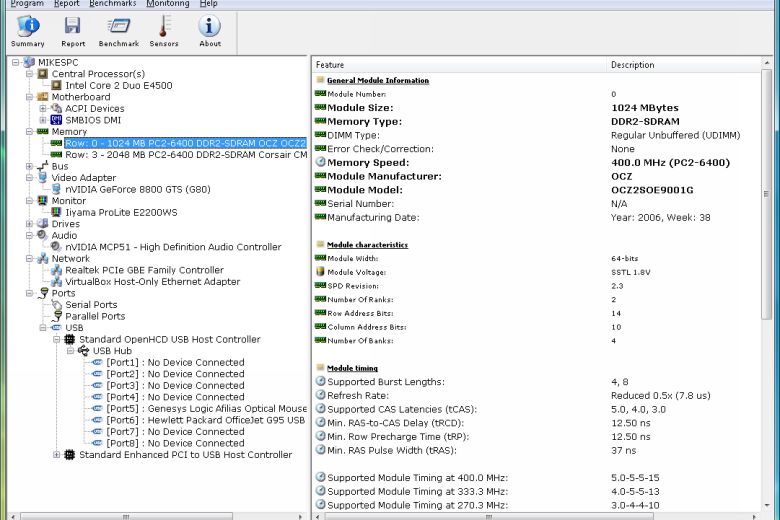
HWiNFO is a system information and diagnostic tool that tells you just about everything you could ever want to know about your PC’s configuration. You’ll find information on the CPU, hard drives, graphics card, motherboard, chipset type, BIOS version and date, memory modules, installed operating system and more. And that’s just the “System Summary” screen.
Move on to the main program and you’ll find a hardware tree that looks a lot like Device Manager, only with far, far more information. On our test PC, for example, expanding the Monitors section of Device Manager only told us about the driver we were using (“Generic PnP Monitor”). HWiNFO managed to tell us the monitor name, serial number, date of manufacture, horizontal and vertical frequencies, supported video modes, and much more (28 items in total). It’s just as thorough when reporting on other areas of your PC, too.
HWiNFO also includes a capable benchmark module, that will test and report on the speed of your CPU, memory and hard drive. And its monitoring tool can track and display your CPU, motherboard and hard drive temperatures, voltages, fan speeds, and more, very useful for detecting hardware problems that might otherwise be hard to spot.
Verdict:
An invaluable system information tool that should be a part of everyone’s troubleshooting toolkit
(2)
System & Desktop Tools
Specifications
Changelog
What’s new in 8.52 (see the version history for more info)?
– Extended number of temperatures monitored (for CPUs with up-to 256 cores).
– Added OSD independent window without title bar.
– Added workaround for thermal throttling stuck sticky on Arrow Lake-H.
– Removed taskbar entry for OSD window.
– Improved support of next-generation AMD server and workstation platforms.
– Improved I3C bus synchronization on Intel Sapphire Rapids and later CPUs.
– Fixed sensor monitoring on some ASRock B850 series mainboards.
– Added support of ITE IT8698E.
– Enhanced sensor monitoring on GIGABYTE Q870M D3H.
– Enhanced support of Intel Wildcat Lake.
– Added monitoring of NVIDIA PCI Express Error Counters.
– Added AMD Radeon AI Pro R9700.
– Improved support of Intel Granite Rapids.