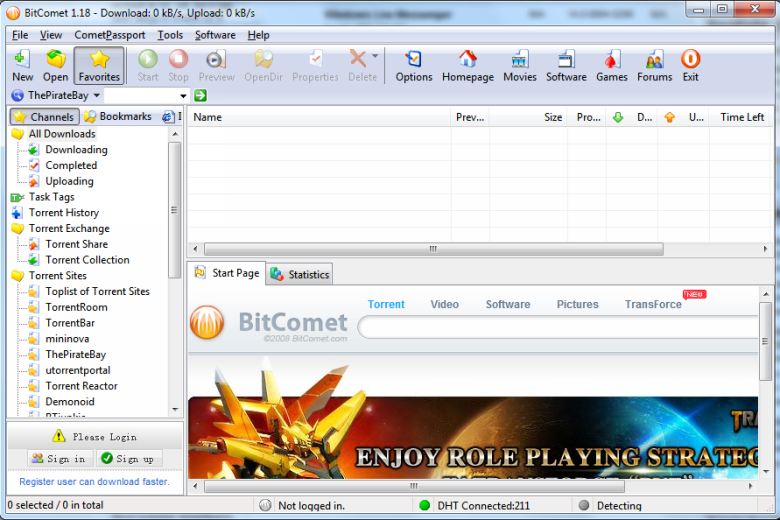
There is no shortage of programs that can be used to download torrents, but BitComet has a combination of features which make it worth checking out. As well as support for standard torrent files, the program can make use of magnet links and downloads that have been paused can be quickly resumed without the need for time consuming file scans.
As well as torrents, the program can also be used to perform HTTP and FTP download, with support for multiple mirrors helping to speed up downloads. uPNP port mapping is automatically configured so there is no need to worry about not been able to connect to other downloaders.
Many file types, including AVI and WMV, can be previewed before a download has completely finished, and intelligent automatic file renaming makes it easier to organise your files. Download prioritising can be used to force one particular download to finish before others, and download and upload speeds will be automatically configured to suit your internet connection.
The program interface includes links to a number of popular torrent sites so you can perform searches without having to fire up your web browser. Tagging and favouriting options make it easy to bookmark sites and torrents for use at a later date.
Verdict:
A fully featured torrent client offering superb download speeds.
Operating Systems:
BitComet
Free
6.00 MB
Specifications
Changelog
What’s new in 2.21 (see changelog for more)?
GUI Improved: new edition of WebUI (function incomplete and still under developing)
GUI Improved: improve the remote download prompt information
GUI Improved: the max connection number for HTTP download task changed from 200 to 2000
GUI Improved: improve bc_bak file format error prompts
GUI Bugfix: peerID not displayed in task page of Remote Download web page
GUI Bugfix: the name of download files can be started with “.”
Core Improve: supports zstd compress for HTTP Tracker, torrent download and visit RSS feeds
Core Improve: encode “+” in URL of HTTP task when sending to web server
Core Improve: improve the block request algorithm when the progress of an HTTP download task is close to 100%